
Bot Website Traffic: Your 2026 Guide to Detection & SEO

Most site owners still talk about bot website traffic like it's a side issue. It isn't. It's the background condition of the modern web.
If you're looking at analytics, paid traffic, SEO engagement, or server load without first asking how much of that activity came from non-humans, you're working off a contaminated dataset. That leads to bad decisions: pausing pages that were fine, trusting click spikes that meant nothing, or paying for traffic that never had buying intent in the first place.
The practical question isn't just how to block bots. It's how to separate noise from signal, then strengthen the signals that matter.
The Invisible Majority on Your Website
In 2024, automated bot traffic surpassed human-generated traffic for the first time in a decade, reaching 51% of all web traffic globally, while malicious bots alone accounted for 37% according to the Imperva Bad Bot Report 2025.
That single fact should change how you read every traffic report.
Most businesses still assume a visit means a person landed on a page, looked around, and either engaged or left. On today's web, that's a risky assumption. A meaningful share of what shows up in your analytics, server logs, and ad dashboards may be automation.

Some bots are useful. Search engines need crawlers to discover and index pages. Monitoring tools check uptime. Feed readers and verification systems do legitimate work behind the scenes.
The problem is that your website doesn't only get the helpful visitors.
Why this matters in plain business terms
Think of your site like a store.
If half the people walking in aren't real shoppers, your footfall number stops being a reliable business metric. You can't judge product interest, staff performance, or store layout from a crowd made up of fake visitors, scrapers, and automated scanners.
The same thing happens online:
- Analytics get skewed when non-human visits pad sessions, exits, or pageviews.
- Ad budgets get distorted when clicks come from invalid or low-quality traffic.
- SEO decisions get weaker when engagement data no longer reflects real audience behavior.
- Infrastructure gets strained when aggressive automation chews through resources meant for customers.
Practical rule: If your reporting assumes every session is a person, your reporting is already wrong.
The conflict teams often miss
Bot website traffic creates two separate jobs.
First, you have to reduce harmful automation. Second, you have to make sure the engagement signals left behind come from real users. Blocking junk without improving real human activity leaves you with cleaner reports, but not necessarily stronger rankings or better campaign performance.
That's why this topic matters beyond security. It affects attribution, budget allocation, SEO diagnostics, and how confidently you can act on your own data.
Good Bots vs Bad Bots A Classification Guide
The simplest way to understand bot website traffic is to stop treating all bots as one thing.
They're not.
A useful analogy is a retail store. Some automated visitors act like staff members doing necessary work in the building. Others act like people who walk in only to steal, disrupt, or clog the aisles so paying customers have a worse experience.
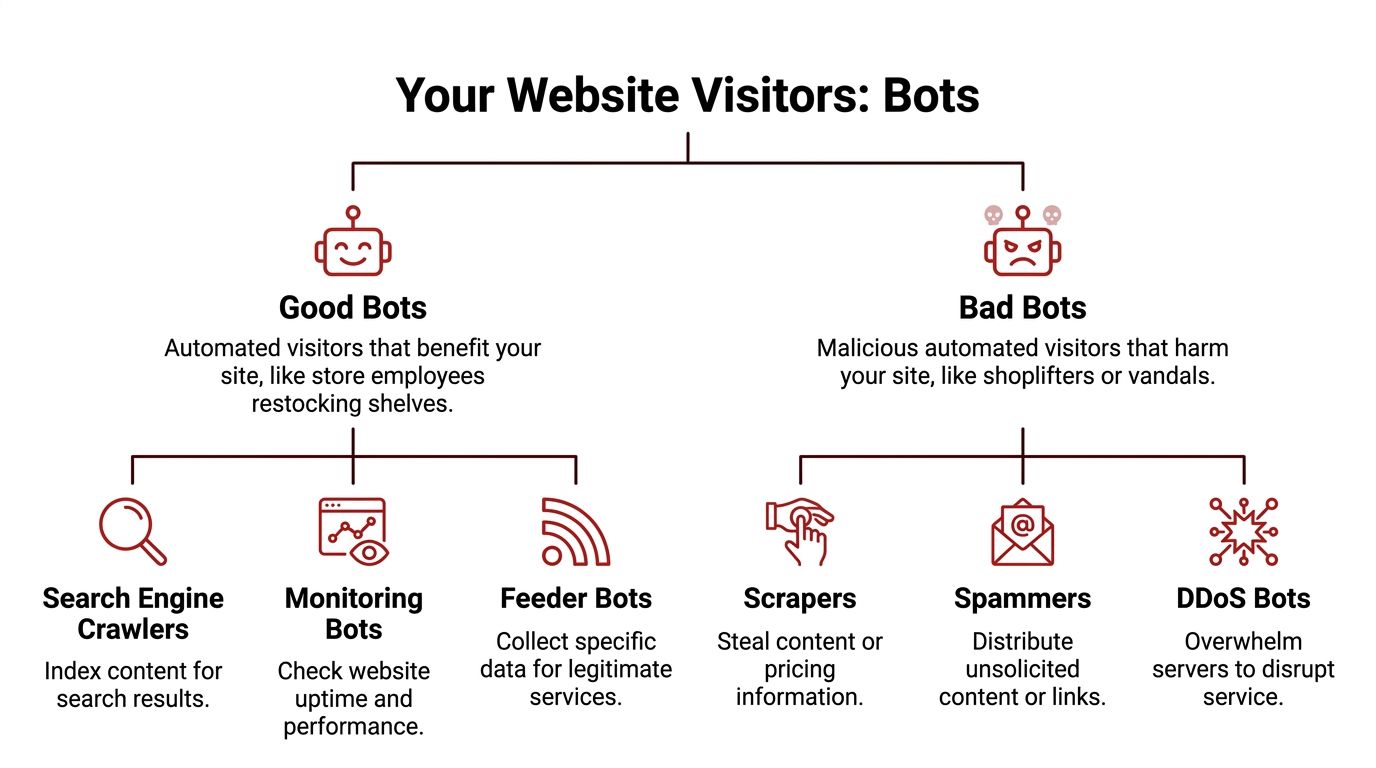
The bots you usually want
Search engine crawlers are the obvious example. If Googlebot can't fetch your pages, indexing suffers. Performance monitors, uptime checks, and some feed or validation tools also belong in the acceptable category.
These bots do consume resources, but they serve a legitimate operational purpose. The mistake isn't letting them in. The mistake is lumping them together with the rest.
A practical way to think about good bots:
| Bot type | What they do | Why they matter |
|---|---|---|
| Search crawlers | Discover and index pages | Support search visibility |
| Monitoring bots | Check uptime, speed, and availability | Help operations teams spot outages |
| Legitimate service bots | Pull data for approved functions | Support integrations and verification |
The bots you usually don't want
Bad bots have a different intent. They scrape content, copy pricing, hit login areas, spam forms, trigger fraudulent ad clicks, or flood infrastructure with useless requests.
Some are loud. They hammer pages and leave obvious footprints.
Others are built to blend in. They spread requests across different locations, mimic browser behavior, and try to look enough like humans that teams don't notice them until reports start looking strange.
Common harmful categories include:
- Scrapers that lift product data, content, or pricing
- Spammers that abuse forms, comments, or low-value pages
- Credential attackers that probe account areas
- Click fraud bots that poison paid traffic data
- Disruptive bots that overload key site paths
The gray area getting bigger
The hardest category now sits between clearly good and clearly bad.
Global crawler traffic rose 18% from May 2024 to May 2025, led by Googlebot's 96% growth and GPTBot's 305% rise, according to Cloudflare's 2025 Year in Review as summarized by The Register.
That matters because many AI crawlers aren't malicious in the classic sense, but they can still become expensive, noisy, and operationally disruptive. They may not be trying to steal accounts or commit ad fraud. But they can still consume bandwidth, hit pages aggressively, and pollute traffic readings in ways that make analysis harder.
A crawler doesn't need malicious intent to become a problem. It only needs to consume resources without creating business value.
A practical classification test
When deciding how to handle a bot, ask three questions:
- Does it support a function you need?
- Does it identify itself consistently and behave predictably?
- Does the value it creates outweigh the load or noise it introduces?
If the answer is yes across the board, it likely belongs in your allowlist or at least your monitored-good category.
If the answer is mixed, treat it as controlled access. Watch it, rate-limit it, and keep it separate in reporting.
If the answer is no, it belongs in your mitigation workflow.
That distinction matters because the wrong response causes its own problems. Blocking everything can hurt discovery. Allowing everything turns your analytics into fiction.
How Bot Traffic Ruins Your SEO and Analytics
Teams often notice bot website traffic only when something breaks. A spike in sessions with no conversions. A paid campaign that burns budget too fast. A sudden bounce-rate shift that sends everyone into a landing page redesign.
Damage usually starts earlier.
Malicious bots make up 37% of web traffic and can lead to up to 30% wasted spend on platforms like Google Ads due to invalid clicks, according to this analysis of how bot traffic distorts demand marketing data and prices.
That waste doesn't stay contained in paid media. It leaks into analytics, SEO, and site performance.
Analytics stop describing people
When bots enter analytics unchecked, your reports start telling the wrong story.
One channel looks like it has huge volume but no depth. Another appears to have terrible engagement, when the page itself may be fine. A campaign gets credit for visits that never represented interest. You end up optimizing around artifacts instead of customers.
Three patterns show up repeatedly:
- Inflated sessions with weak intent that make top-line traffic look healthier than it is
- Abnormal bounce or engagement patterns that push teams to “fix” pages that aren't failing
- Misleading traffic-source buckets that make attribution unreliable
This is why it helps to understand channel anomalies before changing strategy. A good companion read is demystifying direct traffic in Google Analytics, because “direct” often becomes a catch-all bucket for traffic you haven't classified properly, including low-visibility automated activity.
If a page has poor engagement from bots and solid engagement from people, the average still looks poor. That's how good pages get misdiagnosed.
SEO signals get noisier
Google doesn't rank pages because a dashboard says “traffic up.” It relies on many signals, and site owners rely on engagement metrics to infer whether their pages deserve stronger visibility.
Bot interference makes that inference weaker.
If automated traffic lands on a page and leaves instantly, session quality drops. If fake visits click through but don't behave like real searchers, your own CTR and post-click analysis become harder to trust. If crawlers and abusive bots overload the site, performance can slip, and slow pages are bad for users regardless of why they became slow.
A lot of SEO mistakes come from treating a bot problem like a content problem.
Teams rewrite title tags, redesign layouts, cut internal links, or change offers when the issue was traffic quality. In that scenario, SEO work isn't wrong. It's just being applied to the wrong diagnosis.
Later in the stack, tools meant to generate or analyze traffic can add to the confusion if they don't clearly separate automation from real visits. That's one reason many teams audit pages affected by automated traffic bot activity before trusting short-term engagement shifts.
Business costs rise
Bot damage often hides in operational line items.
Server resources get consumed by requests that never had any buying intent. Paid campaigns absorb invalid interactions. Marketing teams spend hours chasing misleading data. Developers and analysts investigate phantom problems.
A common example looks like this:
- Traffic rises on a landing page.
- Bounce patterns worsen.
- Conversions don't follow.
- The team assumes the page is weak.
- They replace a page that was performing well for humans.
- Performance declines because the fix targeted the symptom, not the cause.
This short explainer is useful if you want a quick visual on how automated traffic affects rankings and reporting:
The practical takeaway
Bad bot traffic doesn't just add junk visits. It changes the decisions you make.
When analytics are polluted, your team loses the ability to tell whether low engagement means poor messaging, wrong intent, or fake users. That uncertainty is expensive. It slows SEO progress, weakens testing, and pushes budget toward false positives.
Practical Techniques for Detecting Bot Traffic
Many teams can find a lot with analytics, server logs, and a basic understanding of what human browsing usually looks like.
Detection works best when you compare behavior, not just volume. Bots can generate impressive visit counts. They usually struggle to look normal across source, timing, geography, and session behavior all at once.
Start with analytics, not assumptions
Open GA4 and look for traffic segments that don't behave like a plausible audience.
You're not looking for a single metric that “proves” bot activity. You're looking for combinations that don't make business sense. A burst of traffic from a location you don't target. Lots of sessions with no real engagement. Sharp jumps in pages that aren't actively being promoted.
Use a basic checklist:
- Review engagement outliers. Sessions with zero meaningful interaction or visibly thin engagement often deserve a closer look.
- Check source and medium patterns. Unclear, noisy, or oddly clustered acquisition sources can hide low-quality traffic.
- Compare geography with your real market. If a local service business suddenly gets heavy traffic from irrelevant regions, don't celebrate yet.
- Look at landing page concentration. Bots often over-focus on a narrow set of URLs such as product pages, search results, forms, or login paths.
Field note: Human traffic is messy. It comes from mixed devices, mixed locations, and mixed levels of engagement. Bot traffic often looks too repetitive or too disconnected from your actual market.
Use server logs to confirm what analytics suggest
Analytics platforms summarize behavior. Server logs show the raw requests.
That's where patterns get obvious. Repeated hits to the same paths. Strange request timing. Identical user-agents appearing across unrelated geographies. Heavy traffic concentrated in short bursts.
Cloudflare's bot analysis notes that bots can often be identified by origins in cloud provider data centers such as AWS or GCP, and by unnatural patterns like identical user-agent strings across geos that don't match your market, as explained in its analysis of crawlers and AI bots.
If you haven't worked with logs much, a practical starting point is this guide to cPGuard Bot Attacks Logs. It gives you a grounded way to think about attack signatures and repeated automated requests without needing to become a security specialist overnight.
A few things to scan for in logs:
| Signal | Why it matters | What it often suggests |
|---|---|---|
| Repeated requests to one path | Humans don't usually refresh the same endpoint in rigid patterns | Scripted scraping or probing |
| Uniform user-agent strings | Real traffic is device-diverse | Bot framework reuse |
| Traffic clusters from hosting environments | Consumers usually arrive from residential or mobile networks | Automation infrastructure |
| High request frequency on utility pages | Real users browse unevenly | Crawlers, scanners, or brute-force activity |
Watch what happens on the page
Good bot detection isn't just about where traffic came from. It's also about how it behaves once it lands.
Advanced bots have become better at imitating user movement, but they still tend to leave traces. Their sessions may be mechanically consistent. Their scroll behavior may look unnatural. They may load pages in ways that don't match real reading or shopping patterns.
Front-end behavior monitoring helps here. Session replay tools, bot mitigation layers, and WAF dashboards can reveal whether “engaged visits” are plausible. You're checking for rhythm and intent, not just clicks.
Signals worth comparing include:
- Navigation paths that repeat too perfectly
- Interaction timing that feels machine-paced rather than human-paced
- Form attempts that arrive with no surrounding browsing context
- Device behavior that doesn't line up with declared browser traits
If you suspect synthetic traffic, this overview of fake web traffic is useful for framing the difference between apparent visits and visits that reflect user intent.
Build a detection habit
Teams often fail here because they only investigate after a problem appears.
A better rhythm is simple:
- Check analytics anomalies weekly.
- Confirm suspicious segments against server or security logs.
- Label recurring bot patterns.
- Exclude, block, or isolate them before they influence reporting.
That process won't catch everything. It will catch enough to stop obvious contamination from driving strategy.
Your Defensive Playbook Mitigating Harmful Bots
Blocking bad bot website traffic isn't a single setting. It's a stack.
Teams often look for one fix, install it, then assume the problem is handled. That rarely works for long. One filter misses server-level abuse. A firewall won't clean historical analytics. A CAPTCHA on every page annoys humans and still won't solve scraping.
A layered defense is the practical option because bots attack from different angles.
Start with the easy wins
Clean reporting first. If your analytics views include known junk, every later decision gets worse.
Create filters and exclusions where appropriate. Segment suspicious traffic rather than letting it sit inside your main performance view. Keep internal traffic, monitoring tools, and obvious automation from mixing with user reporting when possible.
Then tighten the obvious entry points:
- Protect forms and login areas with sensible verification
- Restrict abusive request patterns with rate limiting
- Use bot controls in your CDN or WAF instead of relying only on CMS plugins
- Review robots directives for cooperative crawlers, while remembering malicious bots may ignore them
Use friction selectively
CAPTCHAs are useful, but only in the right places.
If you put them everywhere, you damage the user experience for the very people you're trying to protect. If you place them on high-risk actions such as account access, suspicious form submissions, or unusual request bursts, they become much more effective.
The same principle applies to rate limiting. You don't want to slow legitimate browsing. You want to slow repeated, aggressive behavior that no normal visitor would generate.
The goal isn't to make your website hard to use. It's to make abuse expensive and legitimate browsing easy.
Accept the trade-offs
Every defensive layer has side effects.
A strict WAF can block legitimate tools. Aggressive rate limits can catch shared networks. Poorly configured bot rules can interfere with indexing or useful integrations. That's why “block everything suspicious” is not a real strategy.
Use a simple decision model:
| Control | Best use | Common downside |
|---|---|---|
| Analytics filters | Cleaner reporting | Doesn't stop server load |
| WAF bot rules | Broad protection at the edge | Can create false positives |
| Rate limiting | Taming aggressive crawlers and probes | Needs careful thresholds |
| CAPTCHAs | Protecting sensitive actions | Adds friction for users |
| Robots directives | Managing cooperative crawlers | Won't stop malicious bots |
What usually doesn't work
Some approaches sound useful but fail in practice.
Blocking by one user-agent string alone is fragile. Bots rotate identities. Relying only on robots.txt is optimistic. Malicious automation often ignores it. CMS plugin stacks can help at the edges, but they rarely replace log analysis, WAF controls, and source-level review.
The strongest setups combine:
- reporting hygiene
- edge protection
- behavioral checks
- periodic manual review
That mix protects both operations and decision-making. You want fewer bad requests hitting the site, and you want the junk that still gets through to stop polluting your marketing data.
The White-Hat Alternative Amplifying Real Human Signals
Once you've reduced harmful bot website traffic, a different question shows up.
How do you strengthen the signals that matter?
A lot of site owners answer that badly. They buy cheap traffic, run synthetic CTR schemes, or use crude bots that click search results and bounce around just enough to look active. That's the black-hat version of the problem. It replaces one layer of noise with another.
The better alternative is to work with actual human behavior.

Advanced bots now imitate human patterns well enough that real and fake engagement are harder to separate, and even legitimate AI crawlers can pollute CTR and engagement metrics, which is why authentic human interaction matters, as discussed in this piece on how the line between bot traffic and real traffic is getting blurry.
Black-hat simulation versus human engagement
The difference is straightforward.
Synthetic traffic tries to manufacture the appearance of interest. Real-user campaigns try to generate actual search-and-click behavior from people who browse, dwell, and move through pages in ways that look natural because they are natural.
That distinction matters for two reasons:
- Risk. Bot-driven manipulation creates a larger mismatch between reported engagement and real market response.
- Usefulness. Human sessions produce better downstream insights because they behave like users, not scripts.
When signal amplification makes sense
This approach is most useful after cleanup.
If your analytics are still flooded with junk, amplifying engagement won't tell you much. You'll be adding signal on top of unresolved noise. But once reporting is cleaner, improving genuine click-through and on-page interaction can help pages that are stuck despite strong content and decent intent alignment.
In practice, teams usually consider this when:
- rankings hover just outside stronger visibility
- snippets get impressions but weak click response
- pages need more credible post-click engagement data
- they want a safer alternative to automated traffic schemes
One option in that category is buy organic traffic, where the focus is on real-user search behavior rather than robotic visits. The key is not the label. It's whether the traffic comes from humans and whether the engagement pattern reflects plausible user intent.
Clean analytics tell you what's happening. Real human engagement helps you influence what happens next.
The strategic shift
Bot mitigation is defensive. Human signal amplification is offensive.
You need both. If you only fight bots, you get cleaner dashboards but may still struggle to move rankings. If you only chase engagement without cleaning traffic quality first, you can't trust what improved.
That balance is the practical answer in 2026. Remove the fake signals. Then give search engines more authentic ones to observe.
Establishing a Proactive Monitoring Workflow
Bot website traffic problems often return because teams treat them as one-off cleanups.
A better approach is a standing workflow. Short, repeatable, and tied to the tools you already use.
A workable monthly rhythm
Use this as a baseline:
- Review analytics quality. Look for traffic-source anomalies, strange engagement clusters, and landing pages with behavior that doesn't match campaign reality.
- Check security and edge reports. Your CDN, WAF, or host usually shows request patterns you won't see in GA4 alone.
- Compare market relevance. Ask whether the geographies, devices, and paths reflect your actual audience.
- Update exclusions and rules. Add newly identified junk segments to reporting filters or mitigation layers.
- Audit key SEO pages manually. For pages where rankings or CTR matter most, inspect the traffic before making optimization changes.
- Separate cleanup from growth work. Don't evaluate title tags, content updates, or UX changes on polluted datasets.
Keep one principle in view
Traffic quality comes before traffic quantity.
That's true for SEO, paid media, reporting, and conversion analysis. A smaller dataset built from plausible human activity is more valuable than a larger one packed with automation, noise, and invalid interactions.
If you run this workflow consistently, your reporting gets more trustworthy, your mitigation gets sharper, and your growth work stops reacting to fiction.
If you're trying to improve rankings without feeding your site more junk traffic, ClickSEO is worth a look. It focuses on real organic clicks and human engagement patterns, which makes it a more practical fit for teams that want cleaner signals, not more bot noise.