
How to Rank in Google Maps: A Local SEO Playbook
You’ve probably seen this exact pattern. Your Google Business Profile is claimed, your hours are right, you’ve added photos, and you’ve even picked up some reviews. Yet when you search your core term, you’re sitting just outside the money spots. Not invisible, but not visible enough to matter.
That position hurts more than being buried. You’re close enough to know the opportunity is there, and far enough away that most searchers never click.
Why Dominating Google Maps is Non-Negotiable
A lot of businesses still treat Maps like a side channel. It isn’t. It’s where local buying intent shows up first, especially when someone needs a service now, nearby, and on their phone.
The prize is large enough that small ranking movements change the whole lead picture. 46% of all Google searches have local intent, and the top three businesses don’t just show in Maps. They also appear in the Local 3-Pack on standard search results. That means a strong Maps position often gives you two shots at the click instead of one. The same source notes that Google Maps has 1.8 billion monthly active users, users average 50 sessions per month, nearly 90% of consumers rely on it for local discovery, 84% of visits come from keyword searches rather than business names, and 58% of people search for local businesses daily on smartphones.
That last point matters. Most of your future customers aren’t typing your brand name. They’re searching for a need.
If you rank in google maps only for your own business name, you don’t have local visibility. You have branded navigation.
The difference between ranking for “your company” and ranking for “emergency plumber,” “divorce lawyer,” or “water damage restoration” is the difference between existing and competing.
If you want a broader primer on the fundamentals before going deep, this guide to Google Maps SEO is a useful companion resource. But the short version is simple. Winning Maps means controlling relevance, validating location, building authority, and then pushing the engagement signals that separate spot three from spot four.
Mastering the Foundations Google Business Profile and Proximity
Most local SEO problems start with a weak or confused Google Business Profile. Businesses usually think they need more backlinks or more reviews when the profile itself is sending mixed signals.
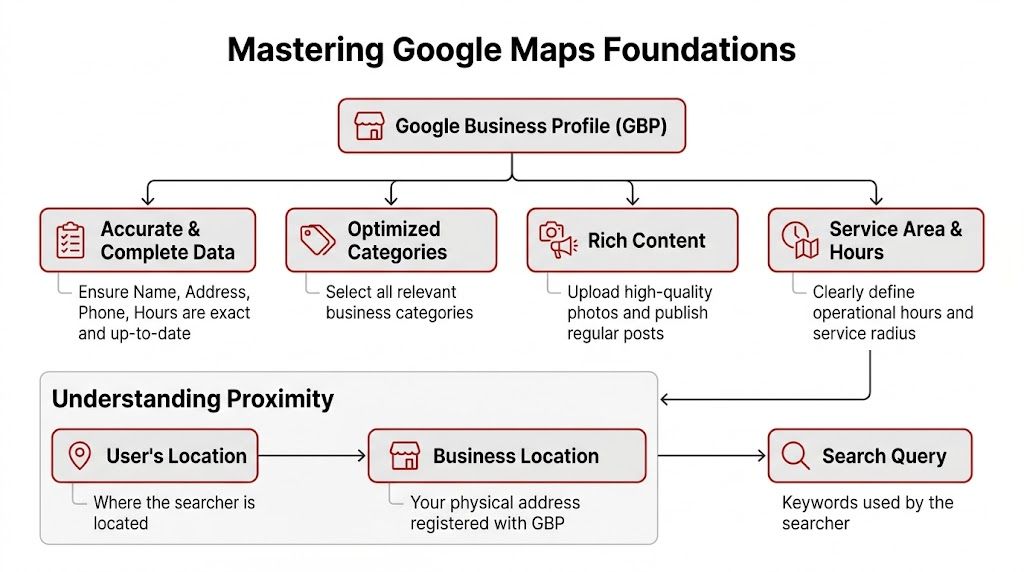
Google has been clear that Maps rankings are driven by relevance, distance, and popularity in its official guidance on how local ranking works. If you want to rank in google maps consistently, every decision inside your profile should strengthen one of those three pillars.
Relevance starts with precision
Relevance is Google’s way of asking, “Does this business clearly match the search?”
That sounds obvious, but most profiles are broad, lazy, or incomplete. A business will choose one generic category, add a vague description, skip service entries, and then wonder why Google doesn’t connect it to specific searches.
Use this approach:
- Choose the closest primary category possible. If the main keyword is “personal injury attorney,” don’t lead with “law firm” unless that’s your only viable fit.
- Add a small set of relevant secondary categories. More isn’t better if the extra categories blur your identity.
- Complete the services section carefully. Use actual service names people search for.
- Make the business description readable first. It should mention what you do, where you do it, and who you help. Don’t stuff it.
- Align your website language with your profile. If your GBP says one thing and your core pages say another, relevance gets weaker.
A useful field-level reference is this Google Business Profile optimization checklist from Constructo Marketing. It’s built for remodelers, but the profile logic applies to almost any local category.
Here’s where experienced operators separate from checklist SEO. They don’t just fill fields. They build a coherent entity. The category, services, photos, description, website landing pages, and review language should all point to the same service themes.
Practical rule: If a searcher lands on your profile and can’t tell within seconds what you do and where you do it, your relevance signals are too soft.
Distance is the factor you manage, not beat
Distance frustrates people because it isn’t fully under your control. If a competitor is much closer to the searcher, you won’t “optimize” your way past that in every query.
But businesses still make distance worse than it needs to be.
Your location signals need to be exact and stable:
- Use the official business address tied to the location you serve from.
- Verify the profile properly and make sure the pin is accurate.
- Keep your service area settings realistic.
- Match the same address and local phone details across your site and major listings.
If you work in a service area business, distance gets more nuanced. You may serve a wide region, but Google still evaluates proximity from the searcher’s position. That’s why owners often think they rank well because they search from the office and see themselves near the top. They’re testing one point on the map, not the market.
This is also why “near me” searches behave differently than category searches from a fixed city term. Search origin changes outcomes. A business can be strong in one neighborhood and weak a few blocks away. If you want a good conceptual explanation of this behavior, ClickSEO’s write-up on the power of near me searches is worth reading.
Popularity is where trust compounds
Google’s support documentation uses “popularity,” while many local SEOs use “prominence.” The practical idea is the same. Google wants to see evidence that your business is known, trusted, and active.
That evidence comes from signals such as:
- Review volume and review quality
- Fresh photo uploads
- Website quality
- Clear service validation across the web
Thin websites weaken this pillar. A one-page site with a few stock sentences rarely supports a strong Maps campaign for competitive terms. If Google checks your site looking for proof that you offer drain cleaning, mold remediation, dent repair, or family law services in the target area, your pages should make that easy.
A simple comparison helps:
| GBP element | Weak version | Strong version |
|---|---|---|
| Primary category | Broad or mismatched | Exact service match |
| Description | Generic company intro | Clear service + local focus |
| Services | Sparse or incomplete | Specific, relevant offerings |
| Photos | Old, few, inconsistent | Recent, real-world, service-focused |
| Website | Thin homepage only | Supporting service and location content |
The setup mistakes that keep profiles stuck
I see the same issues over and over:
- Category drift. Businesses chase extra visibility by adding categories that don’t fit tightly.
- Toll-free numbers. They reduce local trust signals compared with a proper local line.
- Half-completed profiles. Missing services, missing attributes, weak media, outdated hours.
- Website mismatch. GBP says one thing, site says another.
- Dormant activity. No new photos, no updates, no visible engagement.
None of this is glamorous. It works because it removes ambiguity.
What to do this week
If you need a practical reset, do these in order:
- Audit every field inside GBP. Don’t assume it’s correct because it was set once.
- Revisit your primary category. This one choice shapes the profile more than most owners realize.
- Tighten secondary categories. Relevance beats volume.
- Expand service entries. Use the language a real customer would search.
- Refresh media. Add recent, real photos that show the work, team, vehicles, office, or products.
- Check your website support pages. Your profile should never make claims your site doesn’t validate.
When the foundation is clean, the later tactics are effective. When it isn’t, everything else feels random.
Building Authority Beyond Your Business Profile
A strong profile tells Google who you are. External authority tells Google it should believe you.
That distinction matters. Plenty of businesses have decent GBP setups and still can’t rank in google maps across a whole service area because the rest of the web sends weak or conflicting signals.

Clean up NAP before you build anything new
NAP means name, address, and phone. If those details vary across listings, directories, social profiles, and your website, Google gets a mess instead of confirmation.
Local campaigns often go sideways because the business has moved offices, switched call tracking, changed branding, or let old directory listings sit untouched for years. Then they build more citations on top of bad data.
Start with a cleanup process:
- Pick one canonical business name. No extra keywords, no unnecessary variations.
- Lock the main address format. Use the same suite, street abbreviations, and punctuation consistently.
- Use one primary local phone number.
- Check your website footer, contact page, GBP, Facebook, Apple Maps, Bing Places, and core directories.
- Fix duplicates before chasing new citations.
Wrong data doesn’t just fail to help. It creates doubt about which record Google should trust.
Build citations with purpose
Citation work gets oversimplified. People either blast junk directory submissions or ignore citations altogether. Both are mistakes.
The advanced play is more deliberate. The verified data points to a proven SOP described in Moz’s beginner guide to Google Maps ranking: build 100-150 Google My Maps citations with full NAP, layer a Core 30 site structure made up of 1 homepage + 10 category + 20 service pages, and audit spam because 7/20 top spots are often fake listings in audits. In small markets, that approach can reach top-three visibility in 2-4 weeks.
Custom map citations aren’t beginner work, but they’re effective because they reinforce entity consistency inside Google’s own ecosystem. The key is quality control. Every map point, title, description, and business detail has to match the canonical version of your business.
A lot of agencies skip this because it’s manual. That’s exactly why it still creates separation.
Build a site that supports Maps, not just organic
Your website shouldn’t be an afterthought in local SEO. It’s part of your Maps authority.
The Core 30 concept works because it forces structure. Instead of a homepage trying to rank for every service in every town, you create a clean topical map:
- Homepage
- Category pages
- Service pages
This gives Google supporting evidence for the services your profile claims to offer. It also gives you better internal linking, clearer user journeys, and more relevance around long-tail local terms.
Here’s what that usually looks like in practice:
| Page type | Purpose | Common mistake |
|---|---|---|
| Homepage | Brand and primary market signal | Trying to target every service keyword |
| Category page | Group related service intent | Staying too broad |
| Service page | Match specific customer needs | Thin copy with no local context |
A remodeler, for example, shouldn’t rely on one “Services” page. It needs separate pages for kitchen remodeling, bathroom remodeling, room additions, and so on, each supported by relevant location context when appropriate.
Spam reporting is not optional in competitive niches
This part makes some SEOs uncomfortable, but it’s part of the job. If fake listings, keyword-stuffed names, or lead-gen spam are taking top positions, your clean profile may lose because the map is polluted.
The same verified source notes that 7/20 top spots are often fake listings in audits. In some verticals, especially legal, home services, and lead-gen-heavy local markets, you need to review the map results manually and document obvious violations.
Look for:
- Business names stuffed with city and service keywords
- Virtual office abuse
- Duplicate listings
- Listings that don’t appear to represent a real operating business
- Profiles with suspiciously mismatched branding across web properties
Done carelessly, spam fighting becomes a distraction. Done well, it removes obstacles your legitimate business shouldn’t have to compete against.
The Power of Reviews and User-Generated Content
Most businesses treat reviews like a reputation task. Good businesses treat them like a visibility asset.
That difference changes how you ask, when you ask, and what you do after the review comes in. Reviews influence trust with the searcher, but they also add language, freshness, and activity to your profile.

Ask in the moment of satisfaction
The best review systems aren’t aggressive. They’re timely.
If you wait too long, the customer forgets details. If you ask too early, before the job is clearly complete, it feels transactional. The right window is usually when the customer has just felt the value. For a contractor, that might be job completion. For a dentist, it may be after the visit wraps smoothly. For a law firm, it may be after a milestone that the client recognizes as progress.
Use a simple request. Ask them to describe the service they received and their experience. Don’t script fake language. Don’t hand them keyword blocks to copy.
What works:
- Text or email with a direct review link
- Front-desk ask after a positive interaction
- Follow-up message tied to completed service
- A process that runs every week, not a burst once per quarter
What usually backfires:
- Buying reviews
- Review gating
- Pressuring unhappy customers to stay silent
- Long, awkward scripts that sound like marketing
Reviews work best when they read like customer speech, not SEO copy.
Your responses are content too
Business owners often ignore review replies or outsource them to someone who writes the same canned paragraph over and over. That wastes the opportunity.
A good response does three jobs. It acknowledges the customer, adds useful context for future readers, and reinforces service relevance naturally.
For a positive review, mention the service category in plain language if it fits. For a negative review, stay calm, address the issue, and show that a real business is paying attention. You’re not just answering the reviewer. You’re answering the next prospect who reads the thread.
A weak reply:
- “Thanks for your feedback.”
A stronger reply:
- “Thanks for trusting us with your kitchen remodel. We’re glad the design and installation process felt smooth from start to finish.”
That’s still human, but it gives more context.
Use questions and answers before competitors define you
Google’s Q&A area is underused, and that makes it valuable.
Seed common questions yourself through legitimate means and answer them clearly. Think like a customer who hasn’t called yet:
- Do you offer same-day service?
- Do you work in surrounding neighborhoods?
- Do you take insurance?
- Do you handle emergency calls?
- Is parking available?
Each answer removes friction and improves profile usefulness. It also keeps a competitor, random user, or outdated answer from shaping the first impression.
Before using video in your local workflow, it helps to watch a practical walkthrough of GBP handling and review management:
User-generated content goes beyond star ratings
Customers also upload photos, mention staff names, describe services, and surface details you’d never think to write yourself. That content has credibility because it comes from users, not the business.
Encourage it without forcing it. If a customer wants to share before-and-after photos, a dining shot, or a service outcome, that adds texture to the profile. Real businesses should look lived in, not staged.
Using Engagement Signals to Break Through Plateaus
Most local SEO advice often gets thin here.
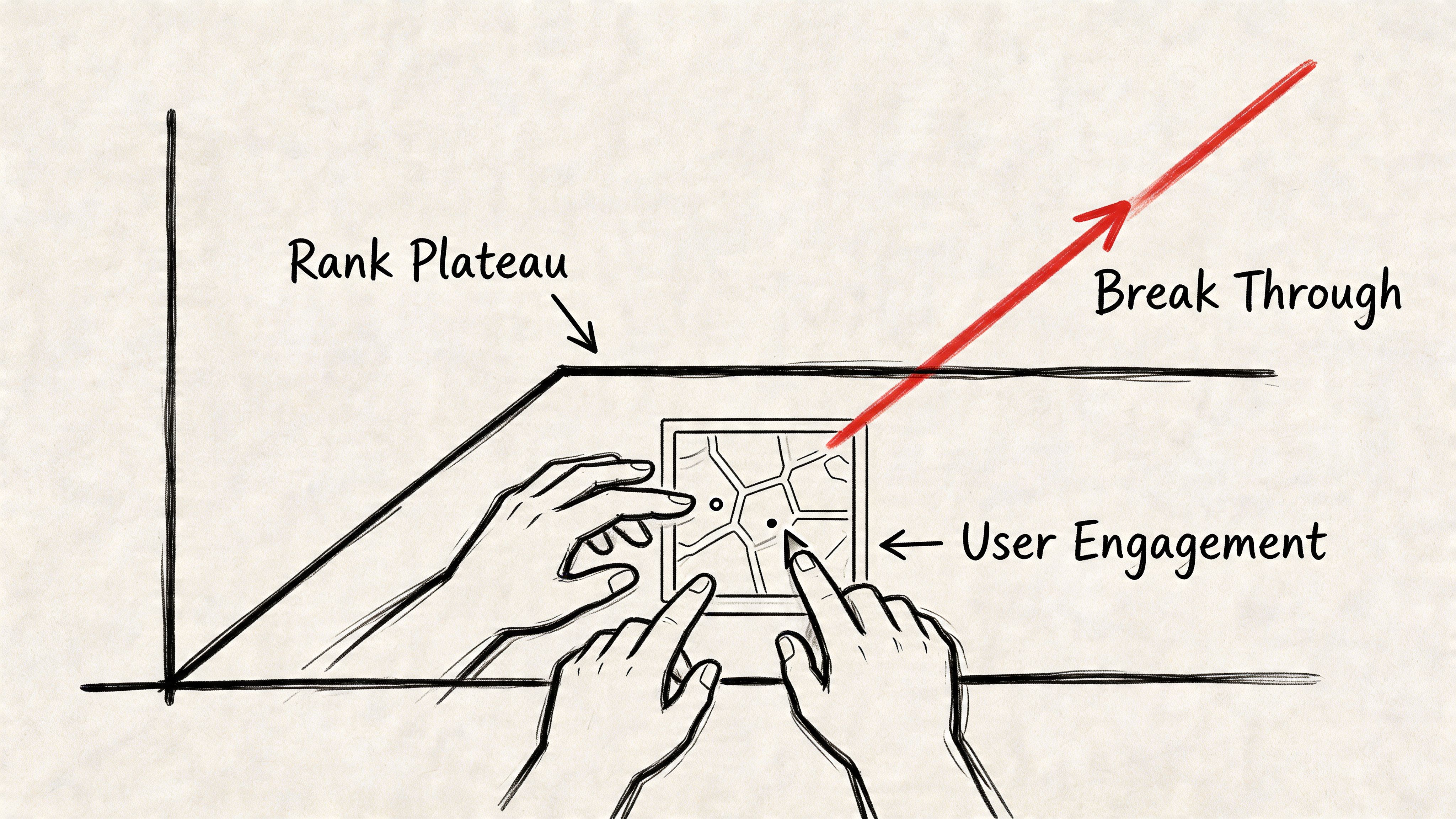
You can have the categories dialed in, citations cleaned up, reviews coming in, and a decent website behind the profile. Yet you still sit in positions four through ten in key areas. The usual guidance keeps telling you to “optimize more,” even when everyone around you is similarly optimized.
That’s where user behavior becomes the missing variable.
Why conventional advice stalls out
The verified data identifies a real gap. There is minimal coverage of how click-through rate and user engagement signals directly influence local ranking positions, even though the Local Pack captures 42% of clicks, as noted in this analysis from On Purpose Media. For businesses competing where relevance is similar and competitors are roughly equidistant, CTR optimization becomes an underexplored lever for companies stuck in positions four through ten.
That aligns with what many practitioners see in the field. Once the obvious technical and profile signals are close to parity, Google still needs a way to tell which listing searchers prefer.
Behavior helps answer that.
If users repeatedly choose one listing, stay engaged, click for directions, browse the website, or continue interacting instead of bouncing, that business looks more relevant in practice, not just in theory.
A listing that gets ignored is sending a signal too. It may be optimized on paper, but searchers aren’t choosing it.
What engagement signals likely look like in real life
Local businesses should think about engagement in layers:
- Click-through from search results or the local pack
- Time spent after the click
- Additional pages viewed on the website
- Direction requests
- Calls placed from the profile
- Repeated brand searches after discovery
Not every interaction carries the same weight, and Google doesn’t publish a formula for local behavior. But if your profile earns visibility and users consistently skip it, that’s hard to ignore. The opposite is also true.
This is why some businesses with similar GBP setups don’t move the same way. One business earns attention. Another blends in.
The risk-aware way to think about CTR work
CTR optimization gets misunderstood because people lump it together with low-quality bot traffic. That’s not the same thing.
The strategic version is about authentic search behavior from real users in the right locations. The goal isn’t to fake demand out of nowhere. It’s to reinforce genuine relevance where a business already deserves more visibility than the map is currently giving it.
That matters most when:
| Scenario | Likely issue | Why engagement helps |
|---|---|---|
| You rank just outside the 3-Pack | Signal parity with competitors | Behavior helps differentiate |
| You perform well in one neighborhood, poorly in another | Localized authority gaps | Geo-specific engagement can support weak zones |
| Your site gets few post-click interactions | Weak user journey | Better sessions support trust signals |
If you’re evaluating this area more broadly, ClickSEO’s guide to search behavior and CTR strategy is a useful reference point for understanding how user interaction can affect ranking movement.
The important qualifier is this: engagement work should come after the basics are solid. If the profile is sloppy, the website is thin, or reviews are neglected, CTR tactics won’t fix the underlying problem. But when a business remains stuck on a plateau, engagement can be the factor that creates separation.
Measuring What Matters Local Rank Tracking and Analytics
Searching your main keyword from your office and taking a screenshot isn’t rank tracking. It’s self-comfort.
Maps visibility changes block by block, and that creates one of the biggest blind spots in local SEO. A business owner sees a good result from one location, assumes things are fine, and misses the fact that surrounding neighborhoods barely see the listing.
The verified data highlights that gap clearly in this write-up on Google Maps SEO and neighborhood-level performance. Current guides acknowledge that proximity affects results block by block, but they don’t give enough practical direction for businesses trying to dominate specific neighborhoods. Local rank tracking tools show whether you’re strong in the city center and weak nearby, and geo-targeted engagement strategies can help improve underperforming zones.
Use grid tracking or accept blind spots
If you want to rank in google maps across a service area, you need grid-based rank tracking.
A local grid tool simulates searches from multiple points instead of one device in one place. That gives you a map of visibility, not a vanity position. This matters for contractors, legal offices, med spas, clinics, and any business where revenue comes from multiple neighborhoods rather than one street corner.
What to look for in a grid report:
- Strong center, weak perimeter
- One corridor of visibility and dead zones elsewhere
- Different results for different keyword themes
- Areas where spam or stronger competitors are suppressing you
This is also where local strategy becomes more realistic. You stop asking, “Do we rank?” and start asking, “Where do we rank, for what, and where are we leaking opportunity?”
Pair ranking data with business outcomes
Rankings alone don’t pay the bills. But rankings connected to action metrics do.
Inside GBP performance data, monitor signals that tie directly to local intent:
- Calls
- Direction requests
- Website clicks
- Photo views
- Search queries triggering your profile
Then compare those patterns with what happens on the site in your analytics stack. If a neighborhood improves in grid tracking and you also see stronger branded traffic, more service-page visits, and more conversions from local landing pages, that’s meaningful movement.
Field note: The best local reporting dashboards combine map visibility, GBP actions, and on-site engagement. Any one metric by itself can mislead you.
A practical setup often includes a grid rank tracker, GBP performance data, and your web analytics platform. For a broader view of the tooling side, this article on SEO ranking tools and measurement essentials is a solid read.
Run a monthly review that forces decisions
Most local SEO reports are too long and too passive. Keep yours tight and decision-focused.
Use a monthly review format like this:
Top keyword grids
- Which neighborhoods improved
- Which stayed flat
- Which declined
GBP action trends
- Calls
- Direction requests
- Website visits
- Photo interaction
Website support pages
- Which service pages are attracting local traffic
- Which pages have weak engagement
- Which pages need stronger internal links or clearer conversion paths
Reputation and profile freshness
- New reviews
- Review response quality
- New photos and updates
- Q&A opportunities
Competitive threats
- New spam
- Aggressive competitors
- Areas where you need neighborhood-specific reinforcement
That review should end with actions, not observations. Add pages. Clean citations. Improve photos. Ask for more review detail. Strengthen weak neighborhoods. Adjust based on the grid, not on guesswork.
The businesses that keep climbing in Maps usually aren’t doing one secret thing. They’re measuring local reality more accurately than everyone else, then acting on it every month.
If your profile is solid, your local SEO foundation is in place, and you’re still stuck outside the top spots, ClickSEO is worth a look. It focuses on CTR optimization through real human search behavior, giving businesses a risk-aware way to strengthen the engagement signals that often separate position three from position four.